
Booking deposits
यह पेज अभी हिंदी में उपलब्ध नहीं है, इसलिए अंग्रेज़ी में दिखाया गया है।
A deposit is money a client pays by card when they book online, to hold their time. It cuts down on no-shows. Each location has its own deposit rules, under Settings > (your location) > Deposits.
Open Deposits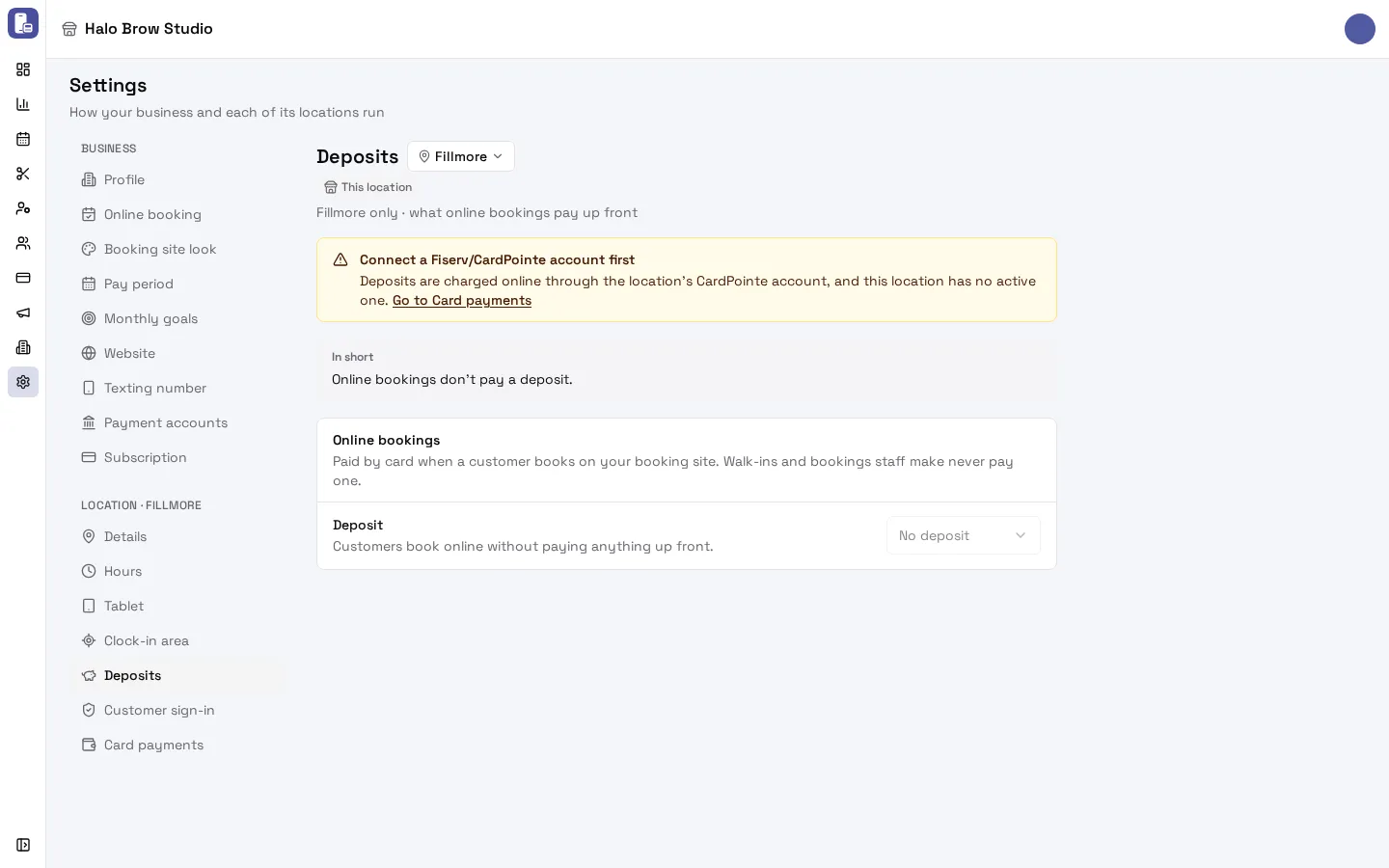
What do I need before I can take deposits?
Section titled “What do I need before I can take deposits?”Two things, both set up by FocalPOS support:
- A Fiserv (CardPointe) payment account connected to the location. Deposits are charged online through the location’s CardPointe account. Email [email protected] to get one connected. You can see it under Settings > Payment accounts and Settings > (your location) > Card payments (see Payments). Stripe accounts can’t take deposits.
- Deposits in your FocalPOS plan. They are included by default.
Until both are in place, the Deposits page shows your settings greyed out with a yellow note:
- Connect a Fiserv/CardPointe account first: the location has no active Fiserv account. The Go to Card payments link takes you to the location’s Card payments page.
- Not included in your plan: deposits are turned off for your business. Contact FocalPOS support to add them.
How do I turn on deposits?
Section titled “How do I turn on deposits?”- Go to Settings, pick the location in the location menu next to the page title, then open Deposits.
- Under Online bookings, choose a Deposit:
- No deposit: clients book online without paying anything up front (the default).
- Fixed amount: the same dollar amount on every booking, for example $20. It is never more than the booking’s total.
- Percentage: a share of the booking’s total, from 1% to 100%, rounded to the nearest cent.
- Full price: the client pays the whole total when booking (prepaid).
- Under Who pays, choose whether Only new customers pay, and an optional Minimum booking total (see below).
- Under Refunds, choose Refunded when canceled and what happens on No-shows (see below).
- Check the In short box at the top. It says your policy in plain words, the way a client meets it, for example: “New customers pay a $20 deposit when booking online. Canceled 24+ hours ahead: refunded; later: kept. No-show: kept.”
- Press Save.
Deposits are per location. A business with two locations sets each one on its own page.
Who pays a deposit?
Section titled “Who pays a deposit?”- Only clients booking online on your booking site. Walk-ins and bookings your staff make (in the dashboard or on the tablet) never pay one.
- Only new customers: turn this on to ask only clients who have never completed an appointment at your business. Regulars book as before.
- Minimum booking total: bookings under this total pay no deposit. Leave it empty to ask on every booking.
When does the client get the deposit back?
Section titled “When does the client get the deposit back?”Refunded when canceled sets the free cancellation time. You can pick Until the start, or 2, 4, 12, 24, 48 or 72 hours before the appointment.
- The client cancels before that time: the deposit is refunded in full.
- The client cancels after that time: you keep it.
- Until the start means any cancel before the appointment starts gets it back.
- If you cancel (for example staff unavailable, or a duplicate booking), the deposit is refunded.
What happens to the deposit when a client doesn’t show up?
Section titled “What happens to the deposit when a client doesn’t show up?”You choose under No-shows:
- You keep it (the default)
- Refunded
When are deposit refunds made?
Section titled “When are deposit refunds made?”Refunds happen automatically, usually within about a minute of the booking being canceled or marked as a no-show. They go back to the card the client paid with. A refund on the same day cancels the charge; on a later day it is a normal card refund, and the client’s bank decides when it shows on their statement (often a few business days).
In Transactions, these refunds show with the reason Deposit policy.
What does the client see when they book?
Section titled “What does the client see when they book?”On your booking site, after they enter their details, the client sees a Deposit box with:
- the amount, and “This location takes a $20 deposit to hold your booking. It is charged now and counts toward your total.”
- the refund terms in plain words, for example “Cancel before Mon, Jun 15, 9:00 AM EDT for a full refund. If you cancel after that, the deposit is kept.” and “If you don’t show up, the deposit is kept.”
- a card form, and a Save this card for future visits box
- a button that says Pay $20 deposit and book
After booking, the confirmation and the client’s “manage my booking” page show the deposit and whether it is Paid, Refunded or Kept by the business. When they cancel, the cancel box tells them what will happen to the deposit before they confirm.
Does the deposit count toward the bill?
Section titled “Does the deposit count toward the bill?”Yes. The deposit is a payment on the visit. At checkout, the front desk only takes what is still owed. With Full price nothing is left to pay; the visit is completed like any prepaid visit.
What does “pending” or “Being charged” mean?
Section titled “What does “pending” or “Being charged” mean?”While the client’s card is being charged, the booking is held:
- The client sees Confirming your payment… and their time is held. If it takes long, they are told not to book again: the payment settles within a few minutes, and they get a confirmation by text and email if it goes through.
- On the appointment in your dashboard, the deposit shows Being charged.
- A booking with a deposit still being charged can’t be moved or canceled until it settles. The client sees “This appointment can be changed once its deposit is confirmed.”
If the card is declined, nothing is booked and the time is free again. The client is asked to try another card.
Where do I see a booking’s deposit?
Section titled “Where do I see a booking’s deposit?”Open the appointment in the dashboard. Its payment section shows the deposit and its state:
| State | What it means |
|---|---|
| Being charged | Waiting for the card to be charged |
| Paid | Paid. It also says until when a cancel gets it back, and the no-show rule |
| Declined | The card was declined, so the booking was released |
| Refunded | Given back to the client’s card |
| Kept | Kept by the business, under the deposit policy or as chosen when canceling |
| Refund failed | The policy gives it back, but the refund didn’t go through. Refund it by hand |
Can I choose to refund or keep the deposit when I cancel?
Section titled “Can I choose to refund or keep the deposit when I cancel?”Yes. When you cancel a booking with a paid deposit from the dashboard, the cancel box has a Refund the $20 deposit checkbox. It starts ticked or unticked based on the reason and your policy:
- Staff unavailable, Duplicate booking or Other: ticked (the client gets it back).
- Customer asked to cancel or Walked out: follows your free cancellation time.
Untick or tick it to decide yourself. What you choose is what happens.
If I change my deposit rules, do existing bookings change?
Section titled “If I change my deposit rules, do existing bookings change?”No. A booking keeps the terms it was made under. New rules apply to new bookings only.
Troubleshooting
Section titled “Troubleshooting”The Deposits page is greyed out. Read the yellow note at the top. “Connect a Fiserv/CardPointe account first” means support still needs to connect a Fiserv account to this location: email [email protected]. “Not included in your plan” means deposits are off for your business: contact support.
I saved, but clients aren’t asked for a deposit. Check that you picked the right location in the menu next to the title. Check Only new customers (a returning client won’t be asked) and Minimum booking total (smaller bookings aren’t asked). Bookings made by staff never ask.
“Not saved” with a message from the server. The message says why, for example the location’s Fiserv account is no longer active. Your edits stay on the page so you can try again.
A client says they were charged but have no booking. If the card was declined, nothing was charged and nothing was booked. If the payment was slow, the booking was held and settles within a few minutes: look for the appointment and its deposit state. Ask the client not to book twice.
A deposit shows “Refund failed”. The refund couldn’t go through (for example the payment account was disconnected). Refund it by hand from the payment in Transactions, or contact support.
A client says they never got their refund. Check the appointment’s deposit state. Refunded means it was sent back to their card; banks can take a few business days to show it. Kept means the cancel was after the free cancellation time, or a no-show with You keep it.