
Set your opening hours
यह पेज अभी हिंदी में उपलब्ध नहीं है, इसलिए अंग्रेज़ी में दिखाया गया है।
Clients can only book during your opening hours. Hours belong to each location, so a salon with two locations sets them twice (or copies them).
इस वीडियो के कदम पढ़ें
खुलने का समय सेट करें
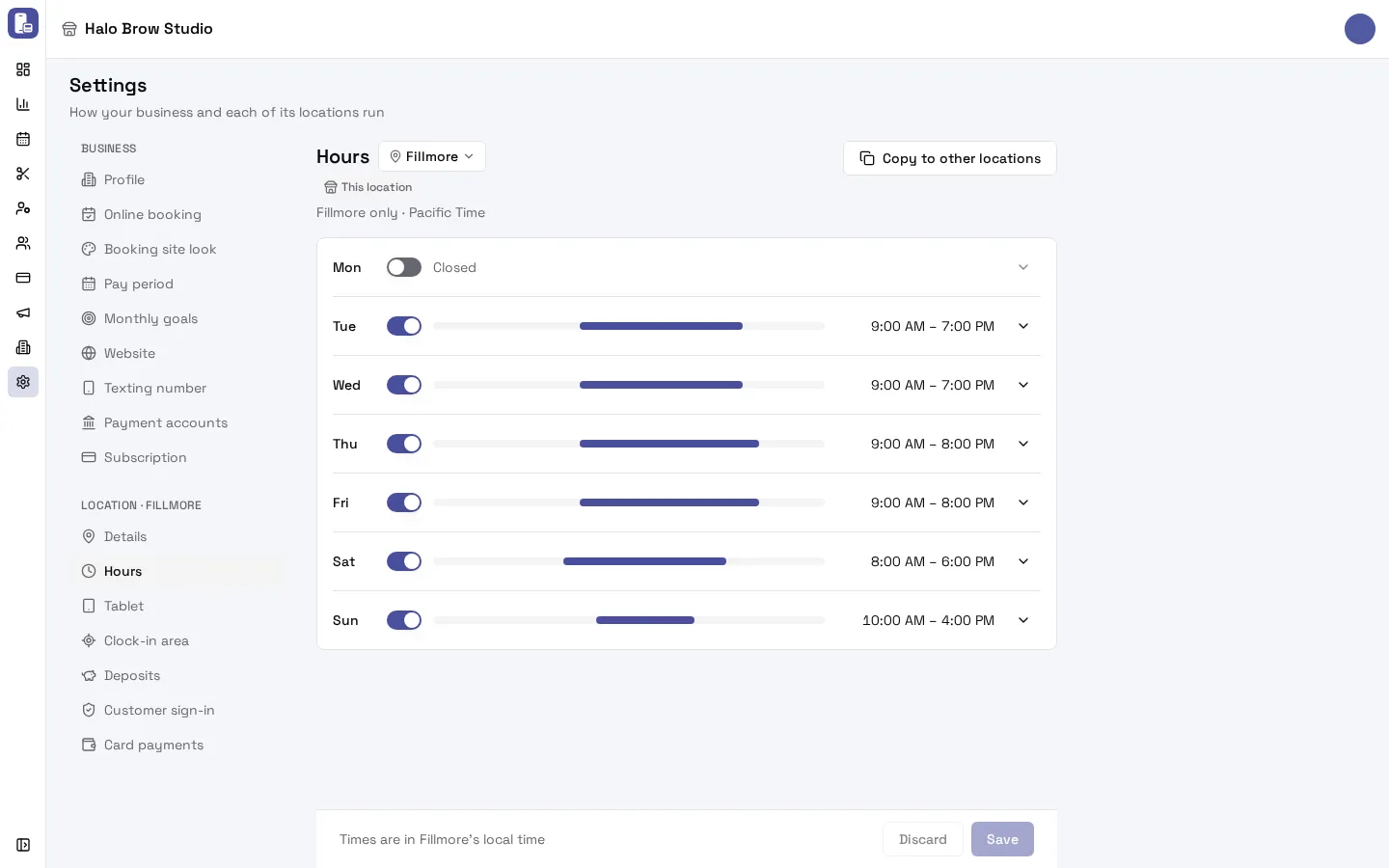
- Open Settings from the sidebar, then Hours under your location.
- Press Set hours to start from typical salon hours.
- Switch a day off to close it. Here the salon is closed on Mondays.
- Press the pencil next to a day to change its times. Drag the bar, or add a break or shift (a lunch break, for example).
- Press Save. Clients can now only book inside these hours.
How do I set my opening hours?
Section titled “How do I set my opening hours?”-
Go to Settings. Under your location’s name, open Hours. If you have more than one location, pick the right one in the location picker next to the Hours title.
-
The first time, the page says your location has no opening hours yet. Press Set hours. It fills in a typical week to start from: Monday to Friday 9:00 AM to 6:00 PM, Saturday 10:00 AM to 4:00 PM, Sunday closed.
-
Use each day’s switch (Open on Monday, and so on) to open or close that day. A closed day says Closed.
-
To change a day’s times, click the day (or the arrow at the end of its row) and drag the ends of the slider. Times move in 15-minute steps.
-
Press Save in the bar at the bottom. Nothing is saved until you do, not even the typical week from step 2. Discard throws your changes away.
All times are in the location’s own time zone, which the page shows under the title (for example “Pacific Time”).
How do I add a lunch break or split day?
Section titled “How do I add a lunch break or split day?”Open the day, then press Add a break or shift. A second time range appears after the first one. Drag both sliders so they don’t overlap, for example 9:00 AM to 12:00 PM and 1:00 PM to 6:00 PM. Clients can’t book in the gap.
To remove a range, press the X next to it (only shown when a day has more than one range).
How do I give every location the same hours?
Section titled “How do I give every location the same hours?”Set and save the hours on one location, then press Copy to other locations at the top of the page and confirm with Copy. It replaces the other locations’ hours with this one’s. Each location can still be changed on its own afterwards.
The button only shows when your business has more than one location, and it’s greyed out while you have unsaved changes: press Save first.
Do opening hours and staff schedules do the same thing?
Section titled “Do opening hours and staff schedules do the same thing?”No, clients need both. Opening hours say when the salon is open. Work schedules say who is working. A time only shows on your booking site when the location is open and someone who does that service has a shift.
Troubleshooting
Section titled “Troubleshooting”Save is greyed out and says a day “has times that overlap”
Section titled “Save is greyed out and says a day “has times that overlap””Two ranges on that day overlap (for example 9:00 AM to 1:00 PM and 12:00 PM to 6:00 PM). Open the day, drag them apart or remove one, then Save.
Clients can book when we’re closed, or can’t book when we’re open
Section titled “Clients can book when we’re closed, or can’t book when we’re open”- Check you’re on the right location in the picker next to Hours.
- Check you pressed Save: the bar at the bottom says “No unsaved changes” once it’s saved.
- Check the location’s time zone in Settings > Details. Hours are in that zone.
- If clients can book people with no shift, look at Allow bookings outside staff schedules in Online booking.
The calendar shows times outside our hours
Section titled “The calendar shows times outside our hours”That’s normal. The calendar always shows the whole day so you can see every booking, and shades the closed hours.
Can I set holiday or one-off closures?
Section titled “Can I set holiday or one-off closures?”Not as a special date yet. For a one-off closure, remove the shifts for that day in Employees > Schedule so nobody can be booked.
How do I add another location?
Section titled “How do I add another location?”On the Business plan, press Add location on your business’s page in Business > Businesses. See Your plan and billing.