
Appointment texts and reminders
यह पेज अभी हिंदी में उपलब्ध नहीं है, इसलिए अंग्रेज़ी में दिखाया गया है।
Appointment texts are the texts about a client’s own booking: the confirmation, the reminders and a thank-you after the visit. They are not marketing, so they don’t count toward your marketing limit and they go out any time of day, right when they’re due.
Open Appointment texts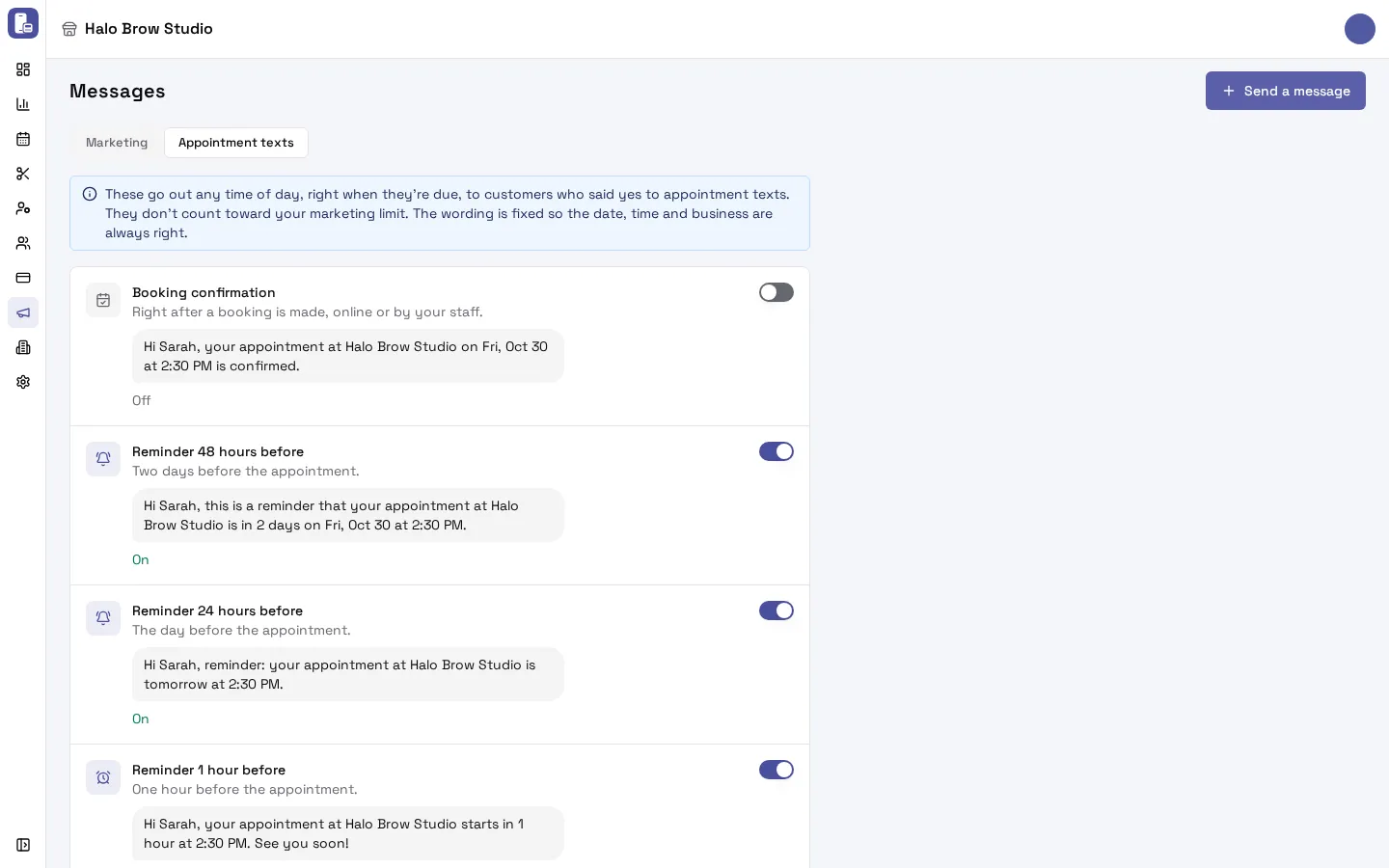
Which appointment texts are there?
Section titled “Which appointment texts are there?”| Text | When it goes out | What it says (example) |
|---|---|---|
| Booking confirmation | Right after a booking is made, online or by your staff | “Hi Sarah, your appointment at Halo Brow Studio on Fri, Oct 30 at 2:30 PM is confirmed.” |
| Reminder 48 hours before | Two days before the appointment | “Hi Sarah, this is a reminder that your appointment at Halo Brow Studio is in 2 days on Fri, Oct 30 at 2:30 PM.” |
| Reminder 24 hours before | The day before the appointment | “Hi Sarah, reminder: your appointment at Halo Brow Studio is tomorrow at 2:30 PM.” |
| Reminder 1 hour before | One hour before the appointment | “Hi Sarah, your appointment at Halo Brow Studio starts in 1 hour at 2:30 PM. See you soon!” |
| Thank-you after the visit | After the visit, as long after as you pick | “Thank you for visiting Halo Brow Studio, Sarah! We hope you had a great experience.” |
The wording is fixed so the date, time and business name are always right. Want an offer in the thank-you? Use the Thank you + offer automatic message instead (that one is a marketing text).
How do I turn on appointment reminders?
Section titled “How do I turn on appointment reminders?”- Go to Marketing > Messages and open the Appointment texts tab.
- Flip the switch next to each text you want, for example Reminder 24 hours before.
- FocalPOS asks you to confirm and shows what will send. Confirm. The change saves straight away.
To turn one off, flip its switch off.
Who gets appointment texts?
Section titled “Who gets appointment texts?”- Texts go only to clients who said yes to appointment texts: on the booking site’s details step, after booking, on the card terminal after paying, or recorded by your staff on the client’s page. See Text consent.
- Emails go to every client who has an email address, whether or not they said yes to texts. They come from “<your business> via FocalPOS”. See Emails to your clients.
Texts go out from the location’s own texting number, or from the business number if the location has none. See Your texting number.
Do appointment texts follow the marketing sending hours?
Section titled “Do appointment texts follow the marketing sending hours?”No. Appointment texts go out any time of day, right when they’re due. A 1-hour reminder for an 8 AM appointment goes at 7 AM. The 9 AM to 5 PM and 8 AM to 9 PM sending hours are only for marketing texts.
When does the thank-you after the visit go out?
Section titled “When does the thank-you after the visit go out?”After the visit is marked Complete, as many hours after the visit ends as you pick on the Thank-you after the visit row. Visits that are never marked Complete get no thank-you, so make sure staff tap Complete on the tablet.
What happens when I move an appointment to a new time?
Section titled “What happens when I move an appointment to a new time?”The client gets an “appointment updated” text (if they said yes to appointment texts) and email. Reminders that already went out for the old time aren’t sent again.
Do appointment texts cost extra?
Section titled “Do appointment texts cost extra?”No. Appointment texts (the booking confirmation, the reminders and the thank-you after the visit) are included in your FocalPOS plan. Only marketing texts (automatic messages and one-time sends) and test texts cost $0.012 each. See Marketing settings.
Troubleshooting
Section titled “Troubleshooting”Why didn’t my client get a reminder?
Section titled “Why didn’t my client get a reminder?”Go through these in order:
- Is the reminder on? Check Marketing > Messages > Appointment texts. Nothing is on until you turn it on.
- Did the client say yes to appointment texts? Open the client in Customers and look at the Text messages card. If they’re not opted in, they get the email but no text.
- Did they text STOP (or CANCEL, END, QUIT…)? That stops every text from your number. Only the client can undo it, by texting START to your number. See Text consent.
- Was it booked in time? A booking made 30 hours ahead gets no 48-hour reminder, and one made 40 minutes ahead gets no 1-hour reminder.
- Is there a client on the booking? Bookings for a guest with no client record get no texts. Walk-ins get no booking texts.
- Does your texting number work? Check Settings > Texting number shows Verified.
- What does the texts list say? Open Marketing > SMS, switch on Show texts not sent, and search the client’s number. See Why didn’t my client get a text?
My client got the email but not the text.
Section titled “My client got the email but not the text.”Emails go to every client with an email address. Texts need their yes to appointment texts and no STOP. Check the Text messages card on the client’s page.
My client got a text but no email.
Section titled “My client got a text but no email.”They have no email address on their client record, or the email bounced or went to spam. Add or fix the email on the client’s page.
Do appointment texts count toward my marketing limit?
Section titled “Do appointment texts count toward my marketing limit?”No. The one-text-every-few-days limit in Marketing settings is for marketing texts only.
Can I change the wording of a reminder?
Section titled “Can I change the wording of a reminder?”No. The wording is fixed so the date, time and business are always right. For your own wording, use an automatic message or a one-time send.